
Bitmo Lab is testing an ultra-thin, bendable tracker built to fit inside items traditional trackers can’t
Updated
February 12, 2026 4:43 PM
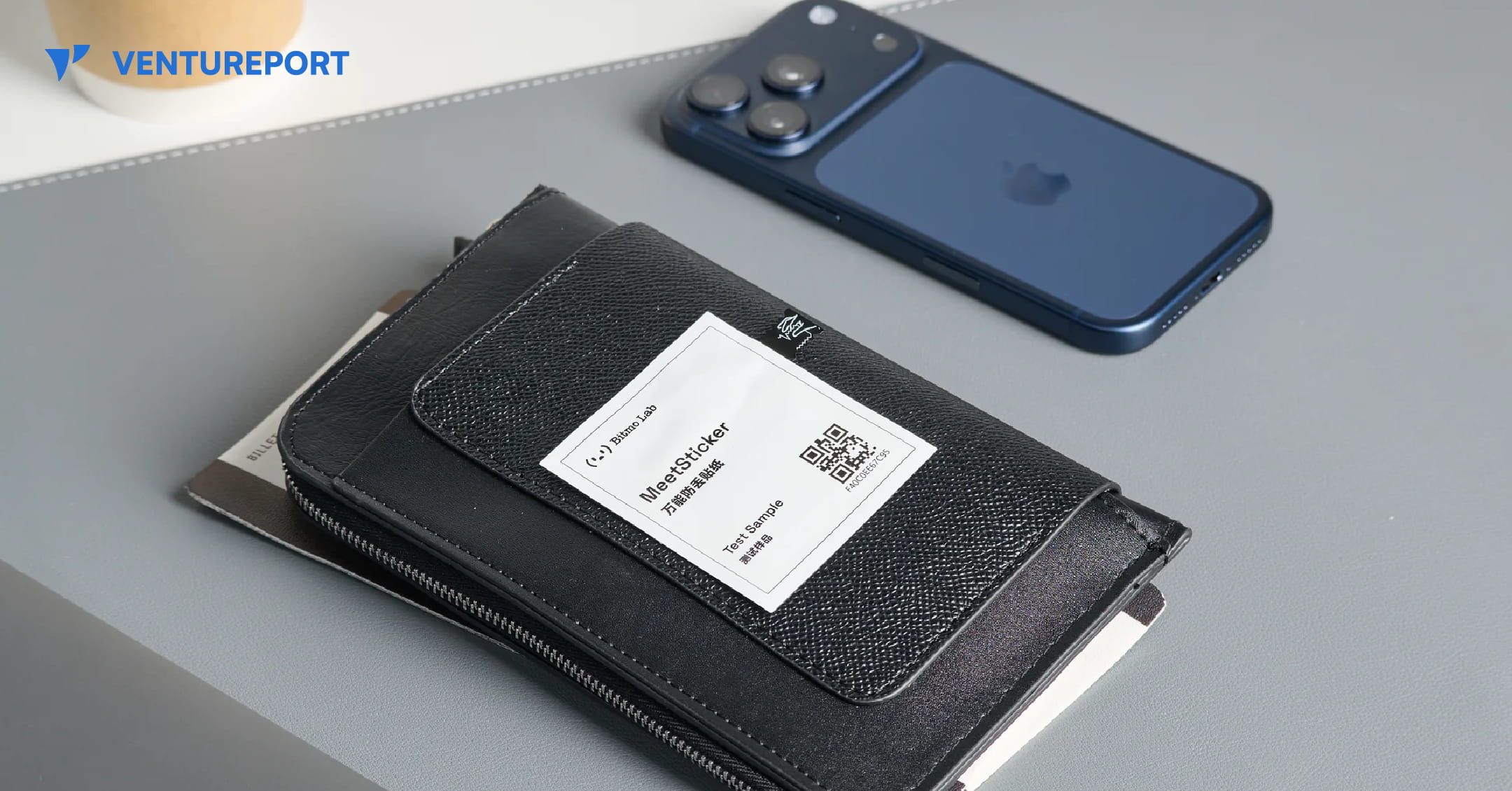
Bitmo Lab's MeetSticker tracker. PHOTO: BITMO LAB
Location trackers have become everyday accessories for keys, bags and luggage. But as personal items grow slimmer and more design-focused — from minimalist wallets to passport sleeves and specialised gear — tracking them has become less straightforward. Most trackers are built as small, rigid discs that assume the presence of space, loops or compartments. That assumption has created a growing mismatch between modern product design and the technology meant to secure it.
Hong Kong–based startup Bitmo Lab is attempting to address that gap with a device called MeetSticker. Instead of the solid plastic casing typical of most trackers, MeetSticker is engineered to be flexible and ultra-thin, measuring just 0.8 millimetres thick. The bendable design allows it to sit within narrow compartments or along curved surfaces without altering the shape of the object. Rather than attaching to an item externally, it is intended to integrate discreetly inside it.
That structural shift is the core of the product’s proposition. By removing the rigid shell that defines conventional tracking hardware, MeetSticker can be placed in items that previously had no practical way to accommodate a tracker. Bitmo Lab states that the device connects through a proprietary network and a companion application compatible with both iOS and Android, positioning it as a cross-platform solution rather than one tied to a single ecosystem.
The implications extend beyond form factor. Objects without obvious attachment points — such as compact travel accessories or specialised tools — could potentially be monitored without visible add-ons. In doing so, the device broadens the scope of tracking technology into categories where aesthetics, aerodynamics or compact design matter as much as functionality.
Before moving toward retail distribution, however, the company is focusing on validation. Bitmo Lab has launched a five-week global alpha testing programme beginning February 9. Sixty participants will receive a prototype unit and early access to the app. According to the company, the programme is designed to assess durability, usability and real-world performance before a wider commercial release. Participants who provide feedback will receive a retail unit upon launch.
Such testing is particularly relevant for flexible electronics. Unlike rigid devices, bendable hardware must withstand repeated flexing, daily handling and environmental exposure. Early user data can help refine manufacturing processes and software optimisation before scaling production.
As with other connected tracking devices, privacy considerations remain part of the equation. Bitmo Lab has stated that data collected during the alpha programme will be used strictly for testing purposes and deleted once the programme concludes.
Whether flexible trackers will redefine the category will depend on how they perform outside controlled testing environments. Still, the introduction of a near-invisible, bendable tracking device reflects a broader shift in consumer technology. As everyday products become thinner and more design-conscious, the tools built to protect them may need to adapt just as seamlessly.
Keep Reading
Take charge of your finances with these top budget monitoring apps that make tracking spending simple, smart, and stress-free.
Updated
January 8, 2026 6:36 PM
.webp)
A phone next to a laptop, displaying a stock market app. PHOTO: UNSPLASH
Managing personal finances can feel overwhelming, especially with the countless expenses we juggle daily. Thankfully, budget monitoring apps are hereto save the day. These handy tools help you track your spending, set financial goals, and build better money habits—all from the convenience of your smartphone.
Whether you're saving for a vacation, paying off debt, or just trying to avoid those end-of-the-month surprises, budget tracker apps can provide clarity and control over your finances. Here are 5 budget monitoring apps that will keep your spending on track.
If simplicity is what you’re after, Monefy is the solution. Known for its highly intuitive interface, Monefy lets users track their spending with just a few taps. Unlike many budget apps that overwhelm you with features, Monefy focuses on the essentials, making it great for beginners or anyone looking for a straightforward way to manage their money.
Monefy is perfect for users who want a no-frills app to track spending or beginners just dipping their toes into budgeting.
Budgeting doesn’t have to feel like a chore, and Fortune City proves just that. This app gamifies your financial habits by turning expense tracking into a city-building game. Every category of spending contributes to your virtual city’s development, making it an enjoyable way to visualize where your money is going.
Fortune City is ideal for those who find traditional budgeting boring or intimidating and want a fun way to stay consistent.
Jupiter combines the best of both worlds: digital banking and budgeting. This app integrates directly with your bank account, automatically categorizing transactions and providing insights into your spending patterns. It’s not just a budget tracker—it’s a full-fledged financial assistant.
Jupiter is best for users who want a hands-off budgeting experience and prefer an all-in-one app for banking and money management.
Inspired by the envelope budgeting method, GoodBudget offers a digital twist on this classic approach. Instead of physical envelopes, you allocate your money into virtual "envelopes" for different spending categories. This app encourages disciplined spending and is particularly effective for budgeters who like to plan ahead.
GoodBudget is ideal for planners who like a structured approach to budgeting and don’t mind manual tracking.
Wally is a feature-packed app designed for users who want deep insights into their spending habits. Its sleek design, multi-currency support, and detailed financial reports make it a standout option, especially for frequent travelers or professionals juggling multiple accounts.
Wally is perfect for users who want advanced budgeting tools and detailed insights, especially those with international financial needs.
Budget monitoring apps are powerful tools that simplify the often-daunting task of managing your finances. Whether you’re drawn to the playful gamification of Fortune City, the structured approach of GoodBudget, or the all-in-one convenience of Jupiter, there’s an app tailored to your preferences and goals.
These apps don’t just track your spending—they help you build better habits, gain financial clarity, and take control of your money. With the right app in your pocket, managing your budget becomes less of a chore and more of are warding journey toward financial freedom. So why wait? Choose an app, start tracking, and watch your financial confidence grow!